[Help] F8 SSD Plus - won't initialize [SOLVED]


[Help] F8 SSD Plus - won't initialize
I think I have tried everything I found in this forum - pulled the init usb from inside and loaded from USB drive - no luck, completely cleaned the SSD, so it looks brand new - no luck, did the manual download of the 2 installation files instead of letting the system do it itself - no luck - I'm probably at about 15 attemps so far and no luck. I'm ready to send it back - and try from a different manufacturer - the SSD I have is on your approved list Samsung 990 Pro SSD 4TB PCIe 4.0 M.2 2280 - any suggestions that I have not tried?

Re: [Help] F8 SSD Plus - won't initialize
At which step did you encounter a problem? What is the abnormal phenomenon you encountered?
Can you provide a description and screenshots? After understanding the specific situation, we may be able to provide you with corresponding suggestions.
Can you provide a description and screenshots? After understanding the specific situation, we may be able to provide you with corresponding suggestions.
To contact our team, please send email to following addresses, remember to replace (at) with @:
Technical team: support(at)terra-master.com (for technical support)
Service team: service(at)terra-master.com (for purchasing, return, replacement, RMA service)
Technical team: support(at)terra-master.com (for technical support)
Service team: service(at)terra-master.com (for purchasing, return, replacement, RMA service)
Re: [Help] F8 SSD Plus - won't initialize
Bought brand new - followed the setup and initialization procedure and it never initializes - after the 5 minute wait it refreshes and can't connect - using the Windows app it says uninitialized - hit the refresh no change - i've cleaned off the SSDs and tried again - same results - do the manual download same results - moved SSDs around in different slots, started with 1 SSD then 2 same results - set it with a dedicated IP address


Re: [Help] F8 SSD Plus - won't initialize
Hello, when you power on without inserting an SSD or press the reset button, can you hear three beeps?
To contact our team, please send email to following addresses, remember to replace (at) with @
Technical team: support(at)terra-master.com(for technical support)
Service team: service(at)terra-master.com(for purchasing, return, replacement, RMA service)
Technical team: support(at)terra-master.com(for technical support)
Service team: service(at)terra-master.com(for purchasing, return, replacement, RMA service)
Re: [Help] F8 SSD Plus - won't initialize
I get 1 beep then a few seconds later 3 beeps
Re: [Help] F8 SSD Plus - won't initialize
If you can hear '1+3 beeps', it indicates that the guide system has started successfully. Regarding the issue of not being able to search for the NAS via TNAS PC, please refer to this troubleshooting guide: viewtopic.php?t=2250.
Additionally, you can directly enter http://tnas.locla/ in your browser to access it.
If you still cannot access it, could you please tell me how the NAS is connected to the PC? Is it connected directly, or connected to the same switch?
Additionally, you can directly enter http://tnas.locla/ in your browser to access it.
If you still cannot access it, could you please tell me how the NAS is connected to the PC? Is it connected directly, or connected to the same switch?
To contact our team, please send email to following addresses, remember to replace (at) with @:
Technical team: support(at)terra-master.com (for technical support)
Service team: service(at)terra-master.com (for purchasing, return, replacement, RMA service)
Technical team: support(at)terra-master.com (for technical support)
Service team: service(at)terra-master.com (for purchasing, return, replacement, RMA service)
Re: [Help] F8 SSD Plus - won't initialize
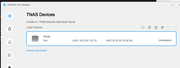
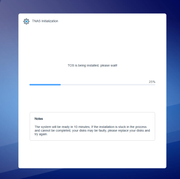
here are screen shoots of the entire process that i have done several times - at the end it always end with the TNAS PC for Windows showing the device and uninitialized - it is directly connected to my PC via the ethernet port



Re: [Help] F8 SSD Plus - won't initialize [SOLVED]
Hello, are you referring to a situation where after the initialization process reaches the system installation stage, the installation is completed but it returns to an uninitialized state?
This may be related to an abnormal BIOS time. Please connect the NAS to a monitor, press Del or Esc during startup to enter the BIOS, and check the system time.
This may be related to an abnormal BIOS time. Please connect the NAS to a monitor, press Del or Esc during startup to enter the BIOS, and check the system time.
To contact our team, please send email to following addresses, remember to replace (at) with @
Technical team: support(at)terra-master.com(for technical support)
Service team: service(at)terra-master.com(for purchasing, return, replacement, RMA service)
Technical team: support(at)terra-master.com(for technical support)
Service team: service(at)terra-master.com(for purchasing, return, replacement, RMA service)


Re: [Help] F8 SSD Plus - won't initialize
Sounds like a networking issue. Is there a network route to the internet? Have you set the ip addresses manually?
F5-221 TOS7.0.1201 - 4x4TB (Ironwolf) Traid
F2-424 TOS7.0.1278 - 2x500GB nvme (P3) Traid, 2x6TB HDD (HGST) Traid
F2-221 TOS7.0.1278 - 1x3TB Ext4, 1x4TB Btrfs
F2-425+ TOS7.0.1278 - 2x500GB nvme (P3) Traid, 2x6TB HDD (EXOS) Traid
F2-424 TOS7.0.1278 - 2x500GB nvme (P3) Traid, 2x6TB HDD (HGST) Traid
F2-221 TOS7.0.1278 - 1x3TB Ext4, 1x4TB Btrfs
F2-425+ TOS7.0.1278 - 2x500GB nvme (P3) Traid, 2x6TB HDD (EXOS) Traid
Re: [Help] F8 SSD Plus - won't initialize
Ok the issue was the date/time in the bios - it was 06/04/2125 - set proper date and time and now works fine
Thanks for your help
Thanks for your help