Empty all bins - Volume page  [Accepted]

Already accepted requirements or suggestions.
Post Reply
User avatar
koalakoala
Posts: 96
Joined: 14 Jan 2023, 06:34
Australia

Empty all bins - Volume page  [Accepted]

Post by koalakoala »

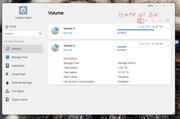
Hi, can you please add an "empty all recycle bins" button to the Volume page (@ control panel).
This will be usefull to identify the free space when moving and deleting large amount of files without going to each volume to empty the bins or without leaving the volume page. thanks


Image
User avatar
TMroy
TM Support
Posts: 3060
Joined: 10 Mar 2020, 14:04
China

Re: Empty all bins - Volume page

Post by TMroy »

koalakoala wrote: 22 Jul 2024, 08:33
To empty the recycle bins, go to 'File manager', right click on Shared folder, and click 'Empty recycle bin'. You just need to do once for each Shared folder. Do you have many Shared folders?
To contact our team, please send email to following addresses, remember to replace (at) with @:
Support team: support(at)terra-master.com (for technical support only)
Service team: service(at)terra-master.com (for purchasing, return, replacement, RMA service)
User avatar
koalakoala
Posts: 96
Joined: 14 Jan 2023, 06:34
Australia

Re: Empty all bins - Volume page

Post by koalakoala »

I know, I have like 80 shared folders, that was why I was asking for a single incon in the "Volume page"
What I found in the meantime is to create a task to empty the folders and run it when required... an icon would be more ellegant and functional for all users
User avatar
Yvee014
Posts: 1
Joined: 02 Mar 2025, 16:17
France

Re: Empty all bins - Volume page

Post by Yvee014 »

TMroy wrote: 22 Jul 2024, 23:24
koalakoala wrote: 22 Jul 2024, 08:33
To empty the recycle bins, go to 'File manager', right click on Shared folder, and click 'Empty recycle bin'. You just need to do once for each Shared folder. Do you have many Shared folders?
It does not work on my TOS 6 F2-424.

I also would like to get a more general "empty recycle bin" button for all the folders in a time
User avatar
Gremlin
Gold Member
Posts: 1624
Joined: 02 Dec 2022, 22:31
Great Britain

Re: Empty all bins - Volume page

Post by Gremlin »

Try Control Panel > Scheduled Tasks > Create and choose your option
F5-221 TOS7.0.0777 - 4x4TB (Ironwolf) Traid
F2-424 TOS7.0.0777 - 2x500GB nvme (P3) Traid, 2x6TB HDD (HGST) Traid
F2-221 TOS7.0.0777 - 1x3TB Ext4, 1x4TB Btrfs
F2-425+ TOS7.0.0777 - 2x500GB nvme (P3) Traid, 2x6TB HDD (EXOS) Traid
User avatar
koalakoala
Posts: 96
Joined: 14 Jan 2023, 06:34
Australia

Re: Empty all bins - Volume page

Post by koalakoala »

Gremlin wrote: 24 Apr 2025, 05:54 Try Control Panel > Scheduled Tasks > Create and choose your option
Thanks - Thats what I have now. But I was after a more efficient way (a simple icon - just one click, actioned when required)
Post Reply

Return to “Accepted”