[Help] Cant overwrite files  [SOLVED]

Permissions, Users, Uear groups, shared folders, LDAP/domain
Post Reply
User avatar
CapCaveman
Posts: 23
Joined: 12 Jan 2022, 20:56
Panama

[Help] Cant overwrite files

Post by CapCaveman »

I am moving my files from Folder 1 to Folder 2 on my F2-425 with TOS 6. I need to make a delta of files from one folder to the other.
Everytime I copy / paste, a new file is made. It does not overwrite the file. How can I fix this? I already changed the behavior to overwrite and still creates a new file.
I am logged as an admin.
Image
User avatar
TMzethar
TM Support
Posts: 2815
Joined: 27 Oct 2020, 16:43

Re: [Help] Cant overwrite files

Post by TMzethar »

This may be due to caching issues; please try restarting your NAS. If you are using an older TOS6 version, please update to the latest version.
To contact our team, please send email to following addresses, remember to replace (at) with @:
Technical team: support(at)terra-master.com (for technical support)
Service team: service(at)terra-master.com (for purchasing, return, replacement, RMA service)

User avatar
CapCaveman
Posts: 23
Joined: 12 Jan 2022, 20:56
Panama

Re: [Help] Cant overwrite files

Post by CapCaveman »

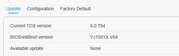
I restarted the TOS and I have the last version. Still, if I copy/paste the file from one folder to another where it exists, it still makes a new (1) file.

Image
User avatar
TMzethar
TM Support
Posts: 2815
Joined: 27 Oct 2020, 16:43

Re: [Help] Cant overwrite files  [SOLVED]

Post by TMzethar »

After confirmation, the coverage function is currently only effective when uploading. It will be fixed in subsequent versions. We apologize for any inconvenience caused.
To contact our team, please send email to following addresses, remember to replace (at) with @:
Technical team: support(at)terra-master.com (for technical support)
Service team: service(at)terra-master.com (for purchasing, return, replacement, RMA service)
User avatar
CapCaveman
Posts: 23
Joined: 12 Jan 2022, 20:56
Panama

Re: [Help] Cant overwrite files

Post by CapCaveman »

Thanks for the confirmation! will wait for the update!
Post Reply

Return to “Privileges”