I still haven't been able to get TimeMachine to work. I have created a dedicated user tried almost every combination of settings related to SMB and Bonjour.
I can manually mount the TimeMachine share and create/edit/delete files. Time machines start a backup run and create a snapshot-incomplete folder but as soon as it creates the sparse bundle the file becomes inaccessible. Other files can be accessed.
I don't know what more to try..
[Help] Can't get TimeMachine working at all [SOLVED]


Re: [Help] Can't get TimeMachine working at all
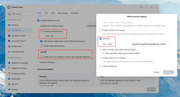
Please enable log transmission and the VFS module, and disable Veto files before trying again. If the backup still fails, please export the logs and send them to our technical support email ([email protected]), and we will analyze them.Please attach the link to this post in the body of the email.
To contact our team, please send email to following addresses, remember to replace (at) with @
Technical team: support(at)terra-master.com(for technical support)
Service team: service(at)terra-master.com(for purchasing, return, replacement, RMA service)
Technical team: support(at)terra-master.com(for technical support)
Service team: service(at)terra-master.com(for purchasing, return, replacement, RMA service)
-
alexanderi

- Posts: 6
- Joined: 10 Jan 2026, 21:25

Re: [Help] Can't get TimeMachine working at all [SOLVED]
I did not have time to look at this until this past weekend.
I updated to the latest version of TOS7 and that did the trick.
Now it works.
I updated to the latest version of TOS7 and that did the trick.
Now it works.